
So you wanna make a custom cart? It's easy - let's do it. I like A2 cards for most things. Traditionally, you're going to see 2 sizes of greeting cards in the mail - A2 and A7. The latter is something you'll see more often on Christmas they're bigger than the A2, which you'll see from everything from 'thank you' to 'happy birthday.'
So, let's talk about an A2. Each 'panel' of the cards is 4.25" wide by 5.5" tall - I'm going to teach you how to do a portrait-oriented card, but if you'd prefer landscape, just turn your computer sideways!!
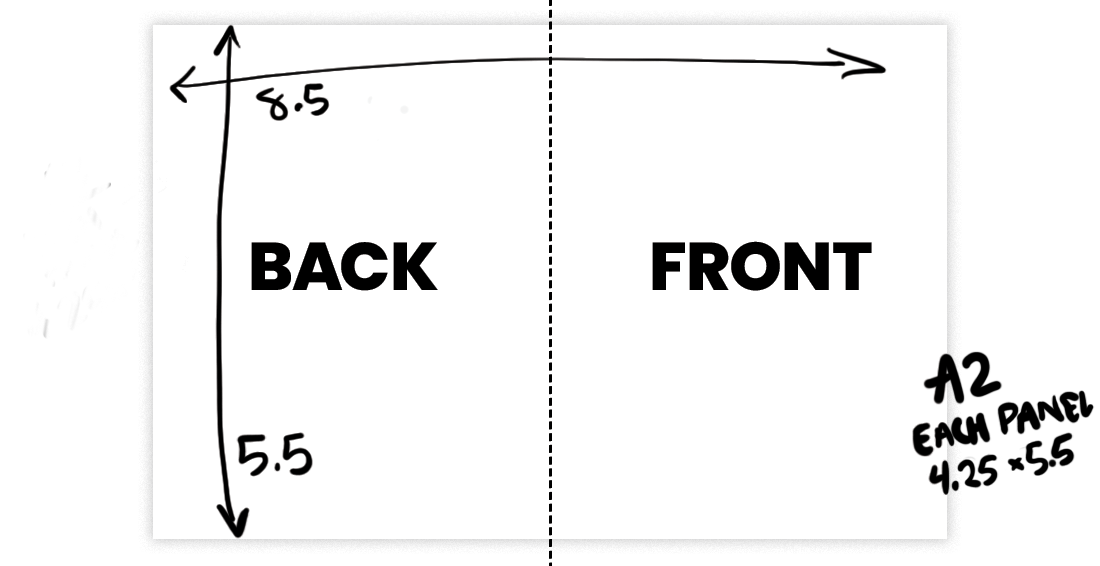
The card should be setup as TWO panels together as ONE file. Like I said, each panel is 4.25x5.5, so both panels next to each other will be 8.5x5.5. You can divide that right down the middle (at 4.25") to find your card's spine. The back of the card will be on the left, and the front on the right.
If you need image or text to 'bleed' off the card, you'll want to add 1/8" (0.125) to each side. That will add 0.25" to each direction. 8.75"x5.75". This might be an advanced move, so if you don't have knowledge of how a bleed works, you may not ready for this just yet. If you're using Canva, when you export, there is a checkbox for 'add trim marks and bleed' - do that, it'll take care of this for you.